
Everybody has experienced it. You enter a trade having automated stop loss or update the stop loss to the value you like, but then you mis-click in the orders window and lose the stop loss. Now you are pressured to retrieve it back to stay protected.
Here is the solution for such cases.
setvar() and getvar() functions
as the name suggests, setvar() is used to set a variable and getvar() is used to read/retrieve/get a variable. The usage is as following:
setvar(NAME,value);
getvar(NAME);
setvar("MYSTOP",38.54);
creates a variable $MYSTOP with a value of 38.54;
while
getvar("MYSTOP");
reads that variable, which is effectively the same thing as just using the variable by its name with $MYSTOP
msgbox(getvar("MYSTOP"));
is the same thing as
msgbox($MYSTOP);
So why bother using getvar?
The dynamic variable naming
Imagine having 3 positions opened, how would we store 3 different values of our stops? (Or any other symbol or window specific variable.)
Now we would need something like $STOP_SYMBOL1 $STOP_SYMBOL2 $STOP_SYMBOL3 etc.variables
if the symbols are AAPL, AMD, NVDA it is easy to acomplish like this
setvar ("STOP_AAPL",260);
setvar ("STOP_AMD",200);
setvar ("STOP_NVDA",180);
You spot the problem already? If we want to use it in a hotkey the SYMBOL is not know until we use the hotkey. So we need it to be more dynamic while keeping the same code.
The string join
In DAS Trader Pro we can join strings and variables together to create longer strings using double quotes and +
msgbox(GetAccountObj(account).openeq);
will show you the account equity.
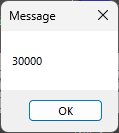
while
msgbox("The account opening equity was: "+GetAccountObj(account).openeq);
will get you
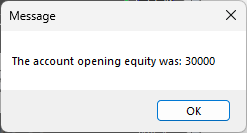
and
msgbox("The account equity is: "+GetAccountObj(account).openeq+"\n And the remaining equity is: "+GetAccountObj(account).curreq);
will get you this
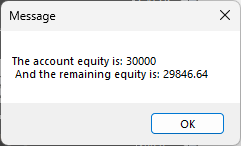
The \n means a new line break
From the above example, we can use the string join with variables to set our dynamic variable name like this
setvar (“STOP_”+SYMBOL,$montage.price);
which will set the variable $STOP_AAPL to a price we clicked on the chart.
Adjusting the entry hotkey
If you use any of the hotkeys provided earlier in https://www.guardiantrading.com/basic-set-of-hotkeys-for-das-trader-pro/ or anything similar to that, we can add a simple function to those hotkeys to save the value for later.
Example entry hotkey:
$MONTAGE=GetWindowObj("MONTAGE1");
$MONTAGE.CXL ALLSYMB;
$buyprice=$MONTAGE.Ask;
$risk=20;
$mystop=$MONTAGE.price;
$pricetostop=$buyprice-$mystop;
$amount=$risk/$pricetostop;
$MONTAGE.share=$amount;
$MONTAGE.ROUTE="LIMIT";
$MONTAGE.Price=Round($buyprice*1.005,2);
$MONTAGE.TIF="DAY+";
$MONTAGE.Buy;
$MONTAGE.TriggerOrder=RT:STOP STOPTYPE:MARKET PX:$mystop ACT:SELL STOPPRICE:$mystop QTY:Pos TIF:DAY+;
We are using the $mystop variable to set the stop at the time of using the hotkey, which is fine, as at the time there is no other script using the $mystop variable. All that is needed is to save the value into the dynamic variable $STOP_SYMBOL like this
$MONTAGE=GetWindowObj("MONTAGE1");
$MONTAGE.CXL ALLSYMB;
$buyprice=$MONTAGE.Ask;
$risk=20;
$mystop=$MONTAGE.price;
setvar("STOP_"+$montage.symbol,$mystop);
$pricetostop=$buyprice-$mystop;
$amount=$risk/$pricetostop;
$MONTAGE.share=$amount;
$MONTAGE.ROUTE="LIMIT";
$MONTAGE.Price=Round($buyprice*1.005,2);
$MONTAGE.TIF="DAY+";
$MONTAGE.Buy;
$MONTAGE.TriggerOrder=RT:STOP STOPTYPE:MARKET PX:$mystop ACT:SELL STOPPRICE:$mystop QTY:Pos TIF:DAY+;
It can be optimized further not to use the $mystop but for this purpose and easier understanding, we just add the new line with the setvar() function.
By altering the entry hotkey like this, we will get all the values we set for the last entry stop loss, which can be used later.
Retrieve the stop order using the saved value
If you are using the stop-loss orders from the previous post at https://www.guardiantrading.com/das-trader-pro-stop-loss-orders/ we can take the set stop to the desired price and adapt it to use the stored price instead of the “clicked price”.
$MONTAGE=getwindowobj("MONTAGE1");
$MONTAGE.CXL ALLSYMB;
$MONTAGE.Route="Stop";
$MONTAGE.StopType="LimitP";
$MONTAGE.STOPPRICE=getvar("STOP_"+$montage.symb);
$MONTAGE.PRICE=ROUND($MONTAGE.STOPPRICE*0.995,2);
$MONTAGE.Share=$MONTAGE.Pos;
$MONTAGE.TIF="DAY+";
$MONTAGE.Sell=Send;
With the above, you can recreate the stop-loss order with the last saved value of the stop for the current symbol.