
The stock market is a dynamic and constantly changing environment, and sometimes we might need to act differently in different situations and set some variable to a user defined value.
This is where the input() function comes into play.
To simply prompt the user for an input, we can call
$Value=Input("Give me the value",Value,1);Which gives us a prompt like this
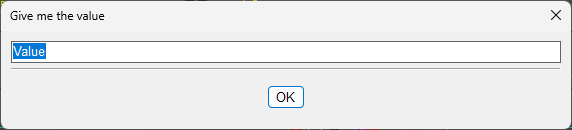
The form is Input(Title,Default,line)
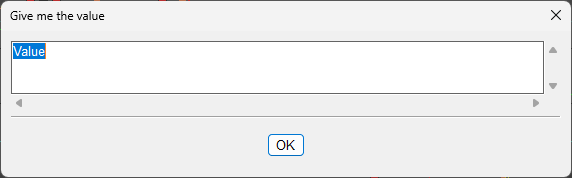
If we change the line value to 3, it will give us 3 line input fields.
Use cases
Prompting for a stop price
Although we can define the stop price by clicking on the chart, some people might prefer to type in the stop price instead.
$StopShort=Input("Enter Stop Price",Price,1);Preparing a breakout trade with stop loss
For this, we need to think ahead a bit and prepare the entry hotkey with the variables that will be prompted and then call an alert creation with the predefined values.
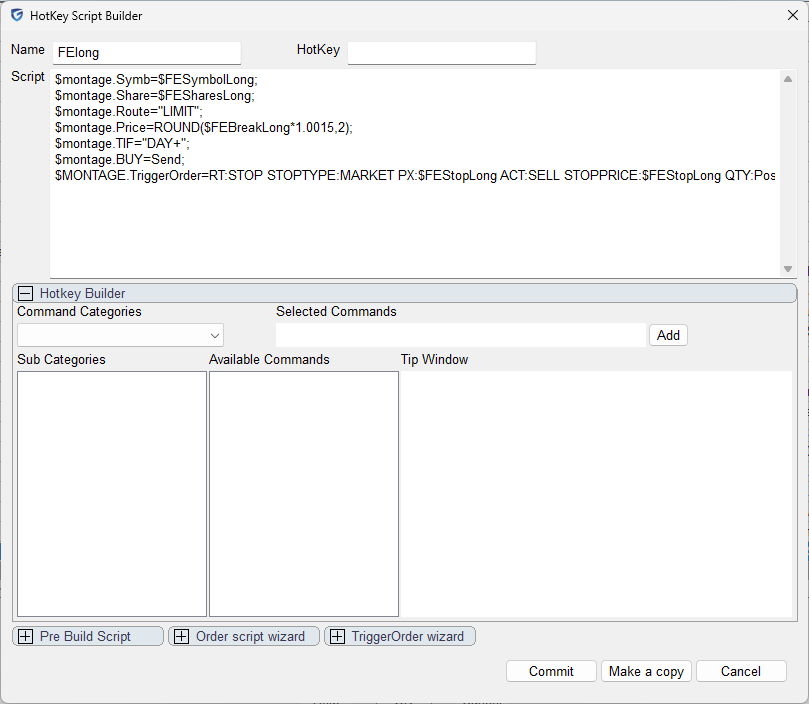
Let's create a hotkey and name it FElong (meaning Future Entry Long)
$montage.Symb=$FESymbolLong;
$montage.Share=$FESharesLong;
$montage.Route="LIMIT";
$montage.Price=ROUND($FEBreakLong*1.0015,2);
$montage.TIF="DAY+";
$montage.BUY=Send;
$MONTAGE.TriggerOrder=RT:STOP STOPTYPE:MARKET PX:$FEStopLong ACT:SELL STOPPRICE:$FEStopLong QTY:Pos TIF:DAY+;
Then let’s create an entry hotkey with the prompts
//define risk
$FERisk=10;
//calculate variables
$FESymbolLong=$montage.Symb;
$FEStopLong=Input("Enter Stop Price",$montage.last-0.5,1);
$FEBreakLong=Input("Enter Break Price",$montage.last+0.5,1);
$FESharesLong=ROUND($FERisk/($FEBreakLong-$FEStopLong));
//create the alert object
$MYALERT=NewAlertObj();
$MYALERT.name="Entry Long "+$FESymbolLong;
$MYALERT.AddItem("Last Sale",">",$FEBreakLong);
$MYALERT.Speak=1;
$MYALERT.SYMB=$FESymbolLong;
$MYALERT.PlaySound=0;
$MYALERT.Autodelete=1;
$MYALERT.Loop=0;
$MYALERT.Script="$montage.symbol="+$FESymbolLong+";$montage.exechotkey\(\"FELong\"\);";
$MYALERT.save();
Adapt the risk at the top for the desired amount. In this case the prompt will ask us to enter the stop price and the breakout price when we want to enter. This is very useful for preparing entries for swing trades or high-of-the-day break-outs, etc.
Here is the hotkey in action.
- Press the hotkey
- Enter the prompts for the stop price and the breakout price.
- See how it creates an alert with action to call the FELong hotkey
- The FELong hotkey is called when the price action is higher than the breakout price
- Automatic stop loss to the desired stop price is set
For completion, here is the FEShort hotkey
$montage.Symb=$FESymbolShort;
$montage.Share=$FESharesShort;
$montage.ROUTE="LIMIT";
$montage.Price=ROUND($FEBreakShort*0.9985,2);
$montage.TIF="DAY+";
$montage.SELL=Send;
$MONTAGE.TriggerOrder=RT:STOP STOPTYPE:MARKET PX:$FEStopShort ACT:BUY STOPPRICE:$FEStopShort QTY:Pos TIF:DAY+;
And the corresponding entry hotkey with the prompts
//define risk
$FERisk=10;
//calculate variables
$FESymbolShort=$montage.Symb;
$FEStopShort=Input("Enter Stop Price",$montage.last+0.5,1);
$FEBreakShort=Input("Enter Break Price",$montage.last-0.5,1);
$FESharesShort=ROUND($FERisk/($FEStopShort-$FEBreakShort));
//create the alert object
$MYALERT=NewAlertObj();
$MYALERT.name="Entry Short "+$FESymbolShort;
$MYALERT.AddItem("Last Sale","<",$FEBreakShort);
$MYALERT.Speak=1;
$MYALERT.SYMB=$FESymbolShort;
$MYALERT.PlaySound=0;
$MYALERT.Autodelete=1;
$MYALERT.Loop=0;
$MYALERT.Script="$montage.symbol="+$FESymbolShort+";$montage.exechotkey\(\"FEShort\"\);";
$MYALERT.save();
Here is the short hotkey in action
Prompting for a date
This is my personal real-life usage example
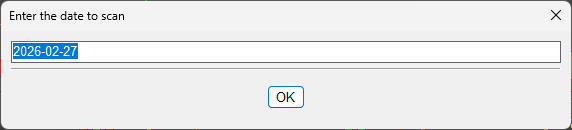
Which I use for running backtests for a specific date
The prompt consists of some data preparations first, as the pre-defined value is always “today”
$TDATE=substring(getwindowobj("MY1MIN").getbar(0).time,0,4)+"-"+substring(getwindowobj("MY1MIN").getbar(0).time,4,6)+"-"+substring(getwindowobj("MY1MIN").getbar(0).time,6,8);
$CANDLESTART=Input("Enter the date to scan",$TDATE,1);
The $TDATE variable reads the current 1-minute chart time and trims the time from it so that only the date remains.