
Adding a price alert quickly
If you need to add a price alert from the chart, the most efficient way is to do it with a script like this.
$MYSYMB=$MONTAGE.SYMB;
$MYALERT=NewAlertObj();
$MYALERT.name="Price Reached";
if($MONTAGE.PRICE<$MONTAGE.LAST)
{
$MYALERT.AddItem("Last Sale","<",$MONTAGE.PRICE);
}
else
{
$MYALERT.AddItem("Last Sale",">",$MONTAGE.PRICE);
}
$MYALERT.Speak=1;
$MYALERT.SYMB=$MYSYMB;
$MYALERT.PlaySound=0;
$MYALERT.Autodelete=1;
$MYALERT.Loop=0;
$MYALERT.save();
It can be a hotkey, a hot button or a window button and it will create an alert like this.
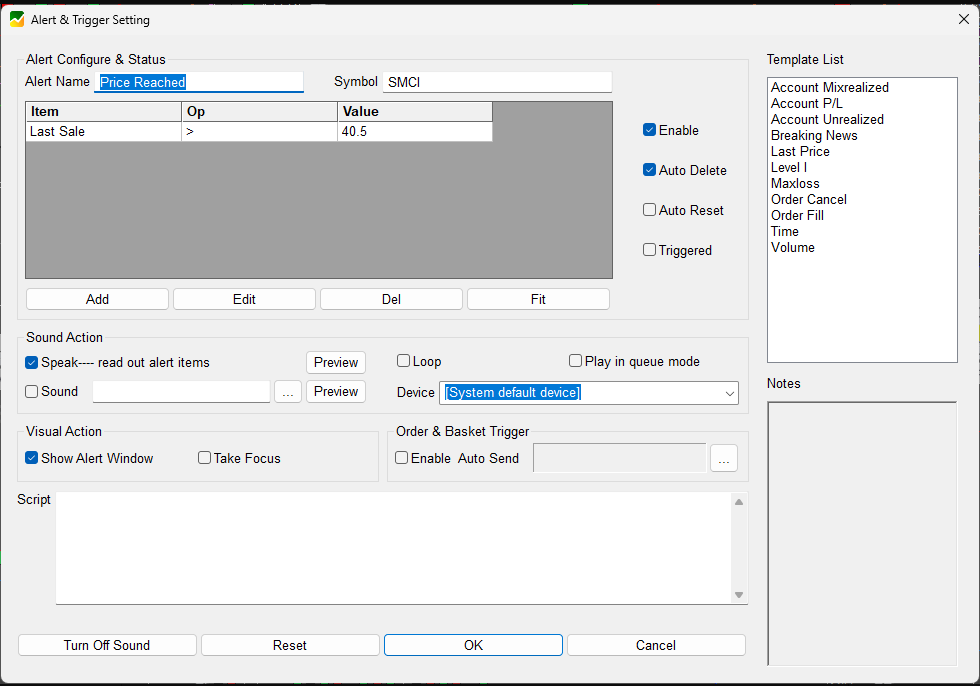
We can tune the needs for autodelete or speak by changing the 1 to 0 in the corresponding lines as needed.
Usage
Just click to the chart and press the hotkey/hot button.
It automatically detects if the price you clicked is above or below the current price and will create a corresponding alert.
The alert will delete itself once triggered, so no need to do cleanup. For more visibility, keep your Alert & Trigger window opened.
That is just a simple price alert. With the usage of the script field in the alert we can use the alerts for various useful things like
- monitoring custom variables
-like a value of an indicator or any calculated variable - calling existing hotkeys
-like exit a position or take a partial - calling external programs
-like powershell script on your pc - monitor for price action events
-like price crossing a moving average - play a sound or read a text
I will be covering the above use cases in future posts
Delete single alert by a script
to delete one script by its name we can use the GetAlertObj() function like this:
GetAlertObj("Price Reached").delete();
which will delete the last created alert.
To delete all alerts with the same name we can repeat the same command maximum 199 times in a “while loop” script like this
$loop=10;
while ($loop>0)
{
$TODELALERT=GetAlertObj("Price Reached");
if (IsObj($TODELALERT))
{
$TODELALERT.delete();
}
$loop=$loop-1;
}
The number 10 means I want to do 10 loops because I am not expecting more than 10 alerts with that name.