
There are multiple ways on how to populate the watch list. For some reason, the watch list is called market viewer in DAS Trader Pro.
1 by 1
This is obvious and most annoying. Type in the symbol in each row, one at a time.
Copy/Paste
This is quite obvious, but many traders do not know about it. Just copy the list of symbols from a table or a text file and paste it directly to the watch list.
Export/Import
There is a built-in feature when you right-click on the market viewer window.
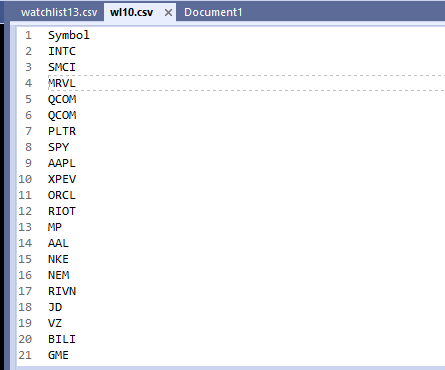
The format of the file should be csv and it really does not have to have all the columns
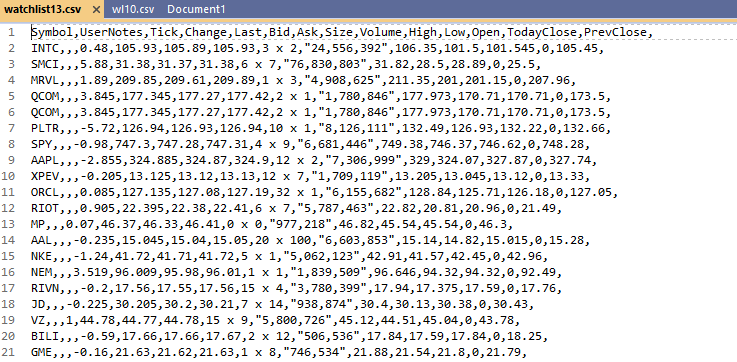
just one column with each symbol on a new line is enough
Use the SetSymbolAtRow() function
This is probably an overkill for just a simple watch list creation but is very useful if you need to address a specific line in the watch list and replace just a specific line with a specific symbol
We can have a watch list built by third-party software prepared in a variable file like this:
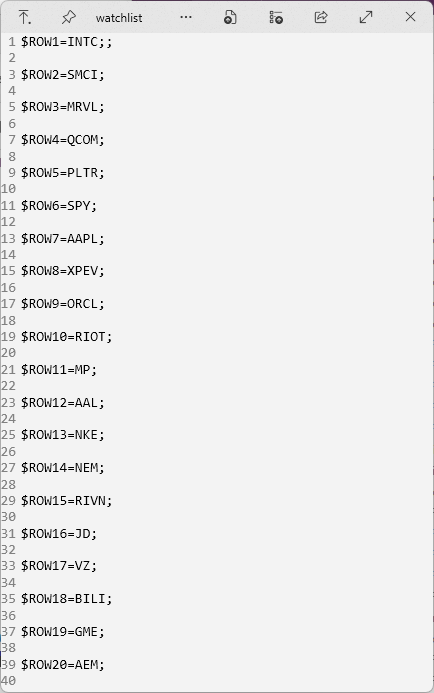
Then read it with the getvarfromfile() function and let it populate the watch list with a script.
$ROW=1;
loadvarfromfile(watchlist);
while ($row<20)
{
setsymbolatrow($ROW,getvar(“ROW”+$ROW));
$ROW=$ROW+1;
}
At the same time, this is effectively the quickest reset to the pre-defined list you can do.