
The topic might sound weird, but there are dedicated functions to retrieve the useful data from the chart based on where the cursor is pointing.
Have you ever needed to know what the price of that candle is? Or what is the time of that candle? Of course you do it by going over the chart with the cursor and read the window hint.
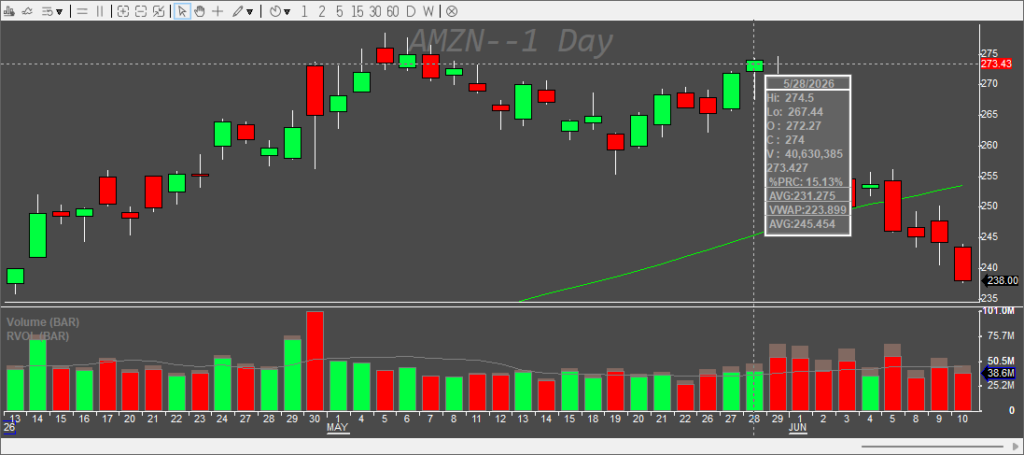
And there it is: the HI, the LO, the date, all the other study values and the price on the Y axis on the right. So how do we read these values so that we can use them in the scripts?
Functions to use
GetMousePtBar(timeFormat)
Returns the bar object where the mouse cursor is pointing to. The parameter timeFormat is the same as the one in the getbar() function.
GetMousePtPrice()
Returns the price of the current mouse pointer location on the chart.
GetMousePtTime(timeFormat)
Returns just the time of the current mouse pointer position on the chart.The parameter timeFormat is the same as the one in the getbar() function.
Practical use cases
It is useful for entry hotkeys, for stop definitions, or even for line drawings.
Stop definition
If we take the reset stop loss hotkey from the previous article, we just replace the STOPPRICE reading from the double-clicked value from the montage with the mouse pointer value
$MONTAGE.STOPPRICE=Round($MONTAGE.Price,2);
to
$MONTAGE.STOPPRICE=Round(GetMousePtPrice(),2);
The complete hotkey then goes like this:
$MONTAGE=getwindowobj("MONTAGE1");
$MONTAGE.CXL ALLSYMB;
$MONTAGE.Route="Stop";
$MONTAGE.StopType="LimitP";
$MONTAGE.STOPPRICE=Round(GetMousePtPrice(),2);
$MONTAGE.PRICE=ROUND($MONTAGE.STOPPRICE*0.995,2);
$MONTAGE.Share=$MONTAGE.Pos;
$MONTAGE.TIF="DAY+";
$MONTAGE.Sell=Send;
It is helpful for people who have certain problems with double-clicking precisely, as this allows them to use one hand for the price definition while the other hand (or voice command) calls the action.
Reading the price of the bar under the cursor without double-clicking the chart
Did you ever wanted to draw the line at the top of some candle, desperately trying to pinpoint the top of it? With this one-liner, you do not have to anymore.
DrawHorzLineWithPrice(getmouseptbar().hi);
You just point to the bar where you want to draw the line and press the hotkey.
Drawing a range of a bar
Let’s say we would like to draw the 30-minute range of a bar
$FILLCOLOR="255,128,128";
$LINECOLOR="255,0,0";
$TRANSPARENCY=-199;
$LINEWIDTH=1;
$bartime=getmouseptbar().time;
$bartime1=getbar().time;
$drawrange=CreateTrendline("Rectangle");
$drawrange.name="RANGE_"+SYMB;
$drawrange.price=getmouseptbar().hi;
$drawrange.time=$bartime;
$drawrange.price1=getmouseptbar().lo;
$drawrange.time1=$bartime1;
$drawrange.visible=1;
$drawrange.Fill=1;
$drawrange.Fillcolor=$fillcolor;
$drawrange.color=$linecolor;
$drawrange.linewidth=$LINEWIDTH;
$drawrange.transparency=$transparency;
$drawrange.sendtoglobal();
Reading the properties of the bar
To read it on the screen under the chart, we create a button named b_candle_prop. It can be type text as we do not need any functionality on it.
Then we create a hotkey that would call the readings and display them in our newly created button.
getwindowobj("my1min").GetCustButObj("b_candle_prop").text="Time: "+GetMousePtTime()+" HI: "+GetMousePtBar().hi+" LO: "+GetMousePtBar().lo;
Limits
The window needs to be in focus. If you happen to have a different window in focus, the resulting reading value will always be 0.