We have plenty of routes to choose from, which is broker-dependent, obviously.
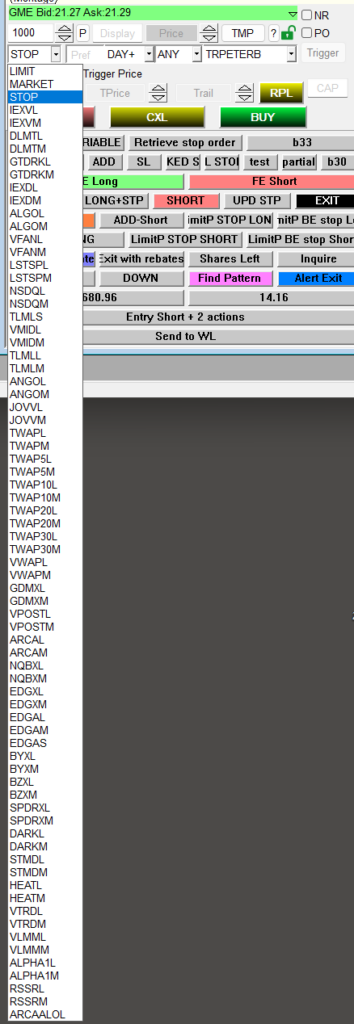
I am not going through the explanation of what they are or what they are to be used for. You can see their descriptions here: https://www.guardiantrading.com/pricing/routes/
Normally you choose the STOP route for your stop orders, and that is it.
stop order style montage (recommended style for advanced hotkeys)
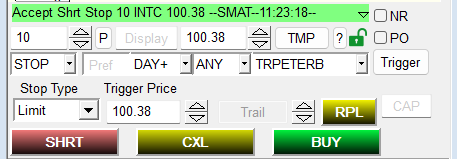
with the PREF field populated
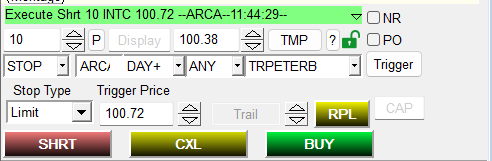
Normally there is no way to set a default preset for a preferred route, so we need to type it manually into the montage each time or add it as a command to the hotkeys.
If you are using any hotkeys syntax, all that is needed is to add a line that says
PREF="ARCA";
or if you use montage object variables
$MONTAGE.PREF="ARCA";
For trigger orders, it needs to add
PREF:ROUTENAME
So if your hotkey with TriggerOrder contains a line
$MONTAGE.TriggerOrder=RT:STOP STOPTYPE:RANGEMKT LowPrice:$NEWSTOP HighPrice:$TARGET ACT:SELL QTY:POS TIF:DAY+
To add the preferred route to the range order, just add
$MONTAGE.TriggerOrder=RT:STOP STOPTYPE:RANGEMKT LowPrice:$NEWSTOP HighPrice:$TARGET ACT:SELL QTY:POS TIF:DAY+ PREF:ARCA;
If you are using the hotkeys from the previous post https://www.guardiantrading.com/basic-set-of-hotkeys-for-das-trader-pro/
Then a long hotkey with a static $20 risk would look like this
$MONTAGE=GetWindowObj("MONTAGE1");
$MONTAGE.CXL ALLSYMB;
$buyprice=$MONTAGE.Ask;
$risk=20;
$mystop=$MONTAGE.price;
$pricetostop=$buyprice-$mystop;
$amount=$risk/$pricetostop;
$MONTAGE.share=$amount;
$MONTAGE.ROUTE="LIMIT";
$MONTAGE.Price=Round($buyprice*1.005,2);
$MONTAGE.TIF="DAY+";
$MONTAGE.Buy;
$MONTAGE.TriggerOrder=RT:STOP STOPTYPE:MARKET PX:$mystop ACT:SELL STOPPRICE:$mystop QTY:Pos TIF:DAY+ PREF:ARCA;
While a short hotkey with a static $20 risk would be
$MONTAGE=GetWindowObj("MONTAGE1");
$MONTAGE.CXL ALLSYMB;
$sellprice=$MONTAGE.bid;
$risk=20;
$mystop=$MONTAGE.price;
$pricetostop=$mystop-$sellprice;
$amount=$risk/$pricetostop;
$MONTAGE.share=$amount;
$MONTAGE.ROUTE="LIMIT";
$MONTAGE.Price=Round($sellprice*0.995,2);
$MONTAGE.TIF="DAY+";
$MONTAGE.Sell;
$MONTAGE.TriggerOrder=RT:STOP STOPTYPE:MARKET PX:$mystop ACT:BUY STOPPRICE:$mystop QTY:Pos TIF:DAY+ PREF:ARCA;
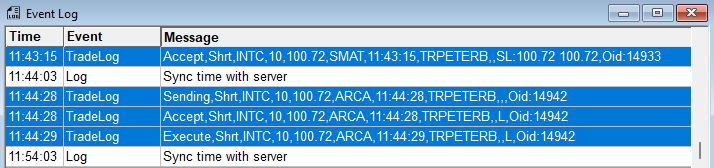
Once the order triggers, you will notice the used route in the event log window. Notice how the order is accepted as SMAT while the execution goes to ARCA when triggered.